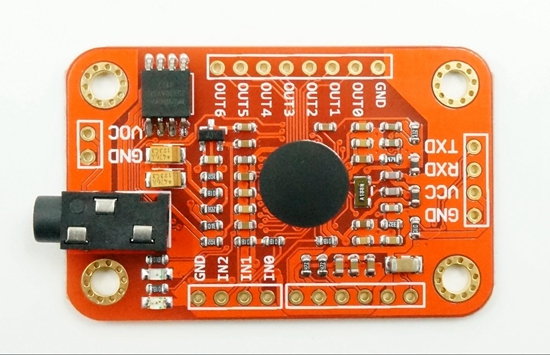
The Voice Control V3 module is a relative cheap module that can recognize 80 words/phrases. However it only can recognize 7 words/phrases at the same time. To recognize sound you first need to train the words/phrases in a training mode. In the recognition mode you can load the phrase identification numbers in special registers. ( I now will use the word phrase in this post but it can also be s word or another sound).
 After this the module waits until the trained phrase is recognized and sends a signal.
I used the state machine idea in he software..
Each state has an id, the state id. When the system starts it starts in state one.
When a (new) voice recognition state is entered the 7 phrase id's are loaded in the module and the software waits until one of the 7 phrases is recognized..
When a phrase is recognized two things need to happen:
- An action is performed
- The machine enters a new state. (In this new voice recognition state the seven new (other) phrases are loaded, the module starts listening to [other] phrases until the module comes again in a new state.)
Each state also has a timeout. When no matching phrase has been recognized before a certain time this also triggers entering a new state and action to be performed.
State table for state(n)
| State | Input | Load | Output | Output |
|---|---|---|---|---|
| StateN | 1 | PhraseId | ActionId | NewStateId |
| StateN | 2 | PhraseId | ActionId | NewStateId |
| StateN | 3 | PhraseId | ActionId | NewStateId |
| StateN | 4 | PhraseId | ActionId | NewStateId |
| StateN | 5 | PhraseId | ActionId | NewStateId |
| StateN | 6 | PhraseId | ActionId | NewStateId |
| StateN | 7 | PhraseId | ActionId | NewStateId |
| StateN | TimeOut | TIME | ActionId | NewStateId |
When the actions are programmed the system can be configured loading a data table containing info about the PhraseId's, ActionId's, StateId's for each state like the state table above.
To make the software more robust i want to do the actions at the beginning of the new state after setting the timer for the timeout not at the end. Therefore after receiving the input trigger i immediate change state and pass the ActionId of the action that needs to be executed to the new state.
Steps after entering a new state are:
1) Set the timer for TimeOut.
2) Load new PhraseId's in the voice module.
3) Do the action (that need to be done due to the previous state change).
4) Wait for the new input triggers.
The details can be loaded from a table and some variables like the Previous_ActionId.
TimeOut also protects for timeout of the actions as it is set before the execution of the action. If needed an action can modify or stop and later restart the watchdog timer to give it more time to execute.
TimeOut also protects for timeout of the actions as it is set before the execution of the action. If needed an action can modify or stop and later restart the watchdog timer to give it more time to execute.
Changing a state can only trigger one action. To facilitate execution of multiple actions after receiving a trigger special states are added: A (numerical) range of states do not load PhraseId's and wait for voice command. This states only execute the actions. When the action is ended it immediately enters a new state.
Special states are also:
0 stop No actions are executed. The system stops.
1 boot No actions are executed. All variables are reset This is the first state that will be executed when system powers up.
Besides the voice input and timeout other triggers can be used to change the state. The module can have hardware like (one one multiple) push buttons or an IRreceiver.
Actions that can be performed also depend on the other hardware. The most simple action is a dummy action that does nothing. Other actions can be e.g. a led (color or blinking), a buzzer to give visual or audio feedback. An IR-transmitter can sends out a IR remote control code, a 433MHz transmitter or bluetooth transmitter for a radio control signal or if connected to an network e.g. a http://request.Other special actions that could be added are learning actions to learn a new voice command or a IR control code.
However the best is not to make your voice recognizer to complex. Let your home automation system control of your home hardware. Let the voice recognizer module communicate to your home automation system. (and only add a led and a buzzer for some feedback.)
To connect the Voice Recognizer V3 to your home automation system using Wifi is a (simple and cheap) ESP8266 module (e.g. the Wemos D1 mini) can be used. This will be presented in one of the next posts about this topic.